 Anna Sheronova
In short
Yes, up to a point. The free WhatsApp Business app runs on your phone plus up to four linked devices, so a few staff can answer the gym's number. As a rule of thumb, that works for about three people on one shift. Past that, or with two shifts or several locations, chats get lost or answered twice because nobody can see who is answering which chat. That is the point to move to a shared inbox.
It is Monday morning. Lisa asked about a trial on Saturday, someone at the desk replied "I'll check and come back to you", and now nobody knows who that was or what was promised. That is the real multi-user problem at a gym desk.
How many people can share one number?
On the free app, one phone and four more screens. Meta's wording is exact: "You can use up to four linked devices and one phone at a time". WhatsApp Web, the desktop app and a second phone all count as linked devices.
So the desk phone, a laptop on WhatsApp Web and a tablet on the gym floor can all show the same chats, and several staff can reply at once.
The phone that has to stay in use
Linked devices keep working when the main phone is offline, but they log out if that phone is unused for more than 14 days. A linked device nobody uses is disconnected after 30 days.
That is usually why linked devices keep logging out. The main phone needs an owner; it cannot sit in a drawer.
Three ways to share one number
| Linked devices (free app) | Multi-agent (paid, not in every country) | Shared inbox (Business Platform) | |
|---|---|---|---|
| How many people | Phone plus up to 4 linked devices | Up to 10 devices on the highest plan | Seats or logins chosen in the inbox software |
| Who answers which chat | Nobody can tell, every device sees every chat | Chats can be assigned | Usually shown per chat, set in the software |
| Who replied | Not recorded | Shown per device or agent | Depends on the software; often shown per chat |
| Access to chats | Every device sees everything | Every device on the account | Can usually be limited by role or location |
| Cost and setup | Free, scan a QR code | Meta Verified or Meta One plan, where available | Software on Meta's Platform, a planned move |
| Fits | One shift, about three people | A small team that wants to stay in the app | Two shifts, several locations, AI on the number |
Multi-agent is Meta's paid feature inside the app. It adds chat assignment and shows which device or agent sent a message. It needs a Meta Verified or Meta One plan, and Meta Verified tiers link 4, 6, 8 or 10 devices. Meta says the feature may not be available to you yet.
A shared inbox runs on the WhatsApp Business Platform, which Meta built for businesses to "communicate with customers at scale". A gym without developers uses it through a partner's software. Seats, who answers which chat, and handover rules come from that software, not from Meta.
Where it breaks at a gym desk
The free app's limit that hurts a gym team is not four devices. It is that nobody can see who is answering which chat.
Most advice treats this as a device count: four, or ten if you pay. But in the free app nothing records who replied or carries a chat from the morning shift to the evening one. More devices, paid or not, do not stop double replies.
- Double replies. Two staff answer Lisa within a minute, with two different prices.
- The weekend lead. Everyone sees the Saturday message, everyone assumes someone else answered, and nobody replies until Monday.
- The shift change. The evening shift cannot tell what the morning promised, or to whom.
- Every screen sees everything. A member's message about an injury or a payment shows on every linked device, including the trainers' tablet.
- The number on a personal phone. If the main phone is a staff member's own, the gym's number and history leave when they do.
Labels, quick replies and the away message help, but they belong to the whole account, not to a person or a shift. A label per staff member shows who meant to answer, not who did.
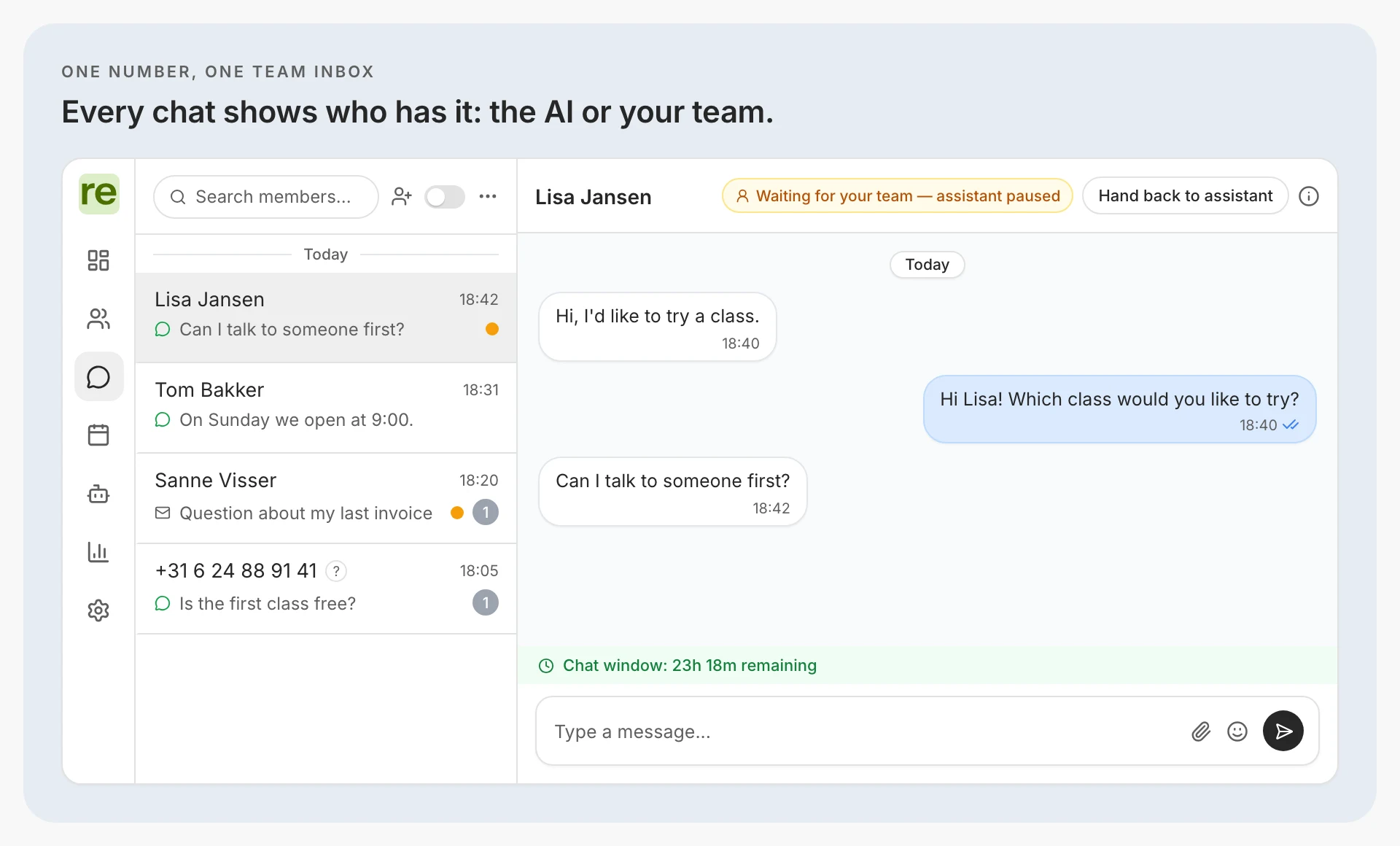
This is where an inbox on your own number earns its place. Regymo's AI agent answers routine questions on your gym's WhatsApp number and hands a chat to your team by your gym's rules. Each chat shows whether the AI is replying or it is waiting for the team.
What a shared inbox changes
In general, shared inbox software turns one crowded phone into a desk: every chat has a visible status and an open chat can be handed on at the end of a shift instead of left in the list.
Our inbox does this on the number your members already use.
- One inbox for the team, for WhatsApp and email. The owner invites staff by email, several people can be logged in at once, and a reply appears live for every colleague, so the next person sees the chat is answered.
- Each chat is with the AI or the team. The status shows "AI replying" or "waiting for the team", so a Saturday lead waiting for a person stands out on Monday.
- The AI hands over by rule. It passes a chat to the team when a member asks for a person, on billing, a complaint, anything medical, or a rule your gym sets. A staff reply takes the chat over, and one button hands it back to the AI.
- The 24-hour window is visible. The inbox shows the time left to reply freely; after that, staff send an approved template.
If your staff would rather send every message with the AI suggesting replies, read AI agent vs AI assistant; for how the desk and the AI split the work, see AI receptionist vs front desk.
Which setup fits your team
- One shift, up to about three people, one location: stay on the free app with house rules.
- A small team that wants to stay in the app: check whether multi-agent is offered on your account.
- More than three people, two shifts, or several locations: move to a shared inbox.
- A shared inbox, with the app still on your phone: add the inbox to the same number and keep the app. WhatsApp Business app or API says what changes in the app.
If your team has ever answered a member twice, or not at all, you have passed the line.
House rules if you stay on the free app
- One person owns the main phone and opens it at least every few days.
- The number lives on a gym phone, not a staff member's personal one.
- One person answers new leads on each shift.
- Hand over in writing at the shift change: which chats are open and what was promised.
- Decide what trainers see before you link their devices, because every device sees every chat.
Questions people also ask
Can two staff reply to the same member at once?
Yes. Meta describes nothing in the free app that stops two people answering the same chat, so the only guard is a rule about who answers.
Can members see which staff member replied?
No. Meta says customers cannot see which agent or device a message came from, even with multi-agent. Every reply comes from the gym.
What happens if our multi-agent plan ends?
Only the four most recently active devices stay linked. Check which devices the desk relies on before you cancel.
Can trainers be kept out of member chats?
Not on the free app. A shared inbox can usually limit access. In our inbox, a gym with several locations gets access set up so staff see only their own locations' members and chats, on one WhatsApp number.
Do I lose my number or chat history if we change setup?
Linking devices keeps both. Adding the Business Platform can keep both too: Meta lets a number stay on the app while it is connected to the Platform, and the last six months of chats come along. If the number is deleted from the app and registered on the Platform alone, the existing message history is lost, so Meta says to back up first.